PipelineHealer started during the AI Dev Days Hackathon kickoff: receive a failed CI webhook, diagnose it, open a fix PR or a structured issue.
Editor's note (March 6, 2026): anchored to submission baseline
v0.3.0(March 2, 2026). Since then: Jenkins bridge (v0.3.2), Assign-to-Agent receiver (v0.4.0), notification sinks (v0.5.2).
By submission it ran on Azure: webhooks in, diagnosis, fix PRs, tracking issues, optional ci-doctor ingestion, dashboard view. Activity Detail in v0.3.0 added Copy Context and a visible Assign to Agent (Coming Soon) affordance. The build diverged from day-one plans.
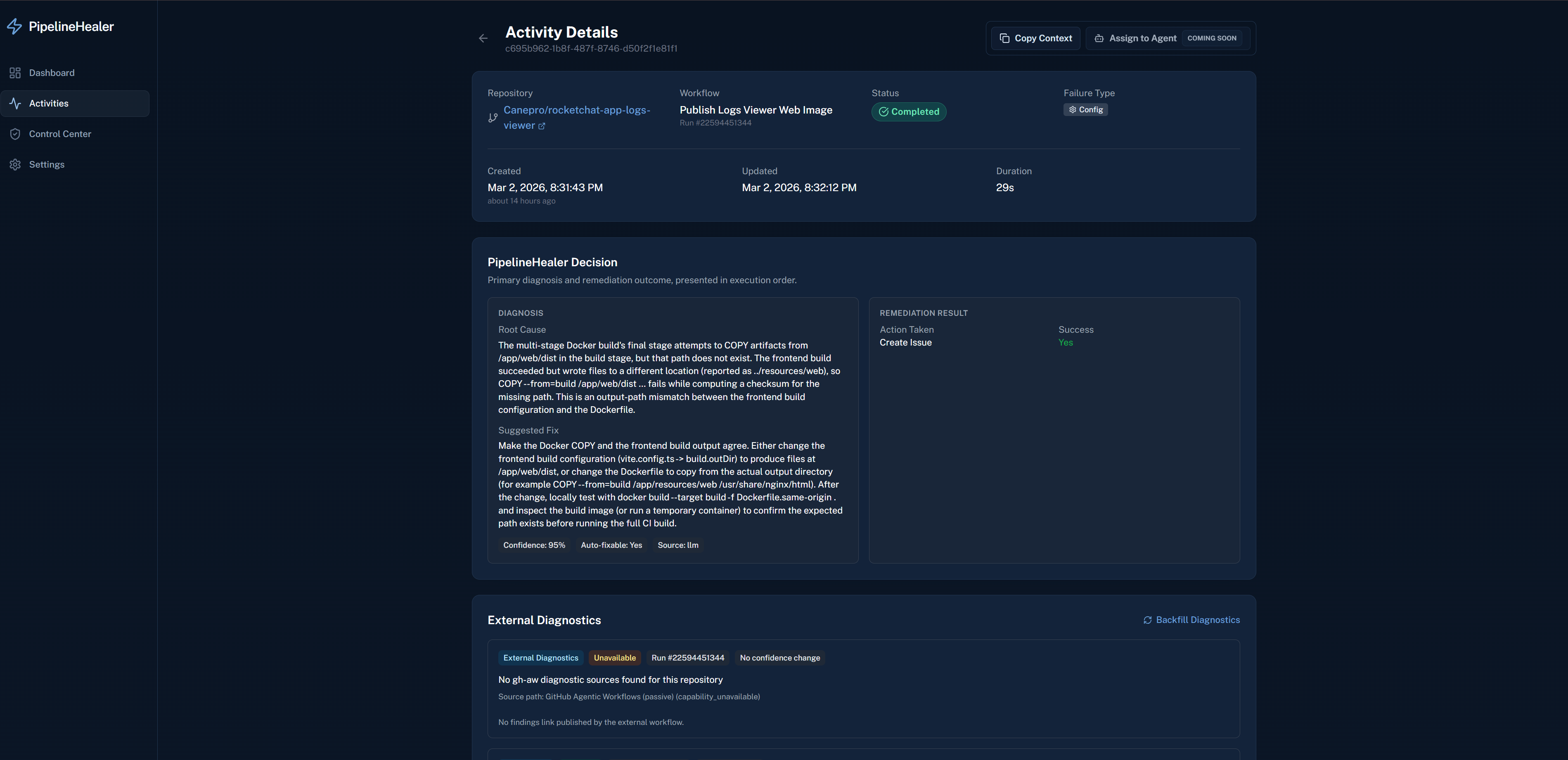
Activity Detail in v0.3.0: AI handoff UX baseline with one-click context copy and visible agent-assignment affordance.
This post covers what paid off, what surprised me, and what I would reorder if starting again.
If you want the implementation-level detail behind the biggest lessons here, Post 4 covers the log-parsing and confidence-gating path, while Post 5 walks through the end-to-end webhook, remediation, and backfill flow.
For full context, see the PipelineHealer repository and the architecture diagram.
What Went Right
1. Pattern-first, model-second
This was the single best architectural decision.
The default with an AI hackathon project is to put the model at the center. Early prototypes sent full log dumps to GPT and asked for fixes. Results were inconsistent and hard to debug.
Pattern matching first, LLM fallback for ambiguity, made behavior predictable.
Benefits:
- Dependency failures, lint errors, and build config issues are resolved without a model call.
- The model handles ambiguous cases where pattern rules run out of signal.
- Pattern matchers are unit-testable with fixtures; model output quality is not unit-testable in the same way.
2. Typed contracts between agents
Every agent handoff is a Pydantic model: LogAnalysis, Diagnosis, RemediationPlan. Validatable and testable without running the full pipeline.
Most multi-agent demos pass free-form text between agents. Typed contracts avoided "agent 2 misunderstood agent 1" bugs.
3. One-command operator interface
I built scripts/ph.sh as a single entrypoint for every operation: deploy, demo, scale, logs, settings, backfill. This was not in the original plan, I added it after getting tired of re-reading runbooks for common tasks.
It turned out to be one of the most useful things in the project. During demo recording, I could run bash scripts/ph.sh warm before starting and bash scripts/ph.sh lowcost after. During debugging, bash scripts/ph.sh logs:grep --pattern "error" replaced multiple Azure CLI incantations.
If I were advising someone on a hackathon project: build your operator CLI early. You will use it more than your UI during development.
4. Treating deployment as product work
I deployed to Azure on day three, before the agents were polished, before the dashboard was pretty, before half the features existed. This was uncomfortable but correct.
Deploying early surfaced identity issues, proxy failures, webhook configuration mistakes, and cold-start behavior that I never would have found locally. Every one of those became a lesson that shaped the final system. Post 3 in this series covers the specific failures, but the meta-lesson is: if your project runs on cloud infrastructure, deploy to that infrastructure immediately. Do not wait until "the code is ready."
5. Safe defaults everywhere
PipelineHealer defaults conservative: low-confidence diagnoses file issues, repo allowlists gate webhooks, healing mode starts at safe. Admin settings support key auth (api_key/hybrid) and Entra roles (entra/hybrid).
No unexpected repo actions during the hackathon.
What Surprised Me
1. External tools run on their own schedule
Integrating GitHub's ci-doctor agentic workflow taught me something I should have anticipated: external tools do not respect your processing window.
PipelineHealer completes diagnosis in 1-2 minutes. ci-doctor can take 10-20 minutes. During this incident, an ~8-minute polling window was not enough, so the system correctly fell back to native diagnosis while external findings arrived later.
I ended up building a full backfill subsystem, background sweep, manual endpoint, CLI command, UI button, to handle late-arriving diagnostics. That entire subsystem was not in the plan. It exists because I ran a real E2E test and watched the gap happen.
By v0.2.9, this path matured into a hybrid model:
- fast-path polling defaults to 60 seconds
- async backfill remains in place for late arrivals
- activities can carry both passive GH-AW findings and direct GitHub MCP context with per-finding source metadata
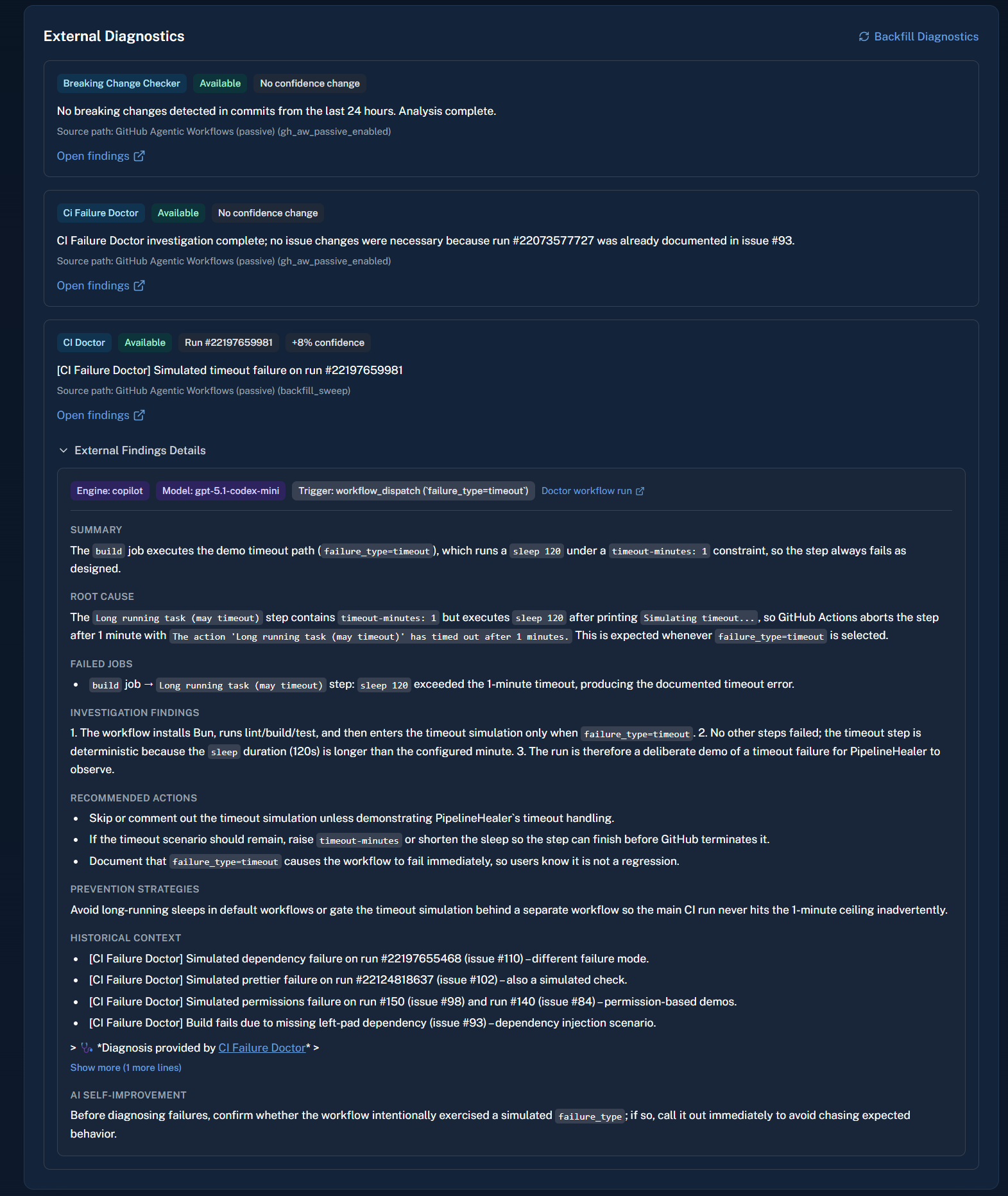
Backfill and enrichment outcome: late external diagnostics are rendered as structured findings instead of raw text.
2. Sanitization is a feature
When I started parsing ci-doctor issue bodies for structured content, I expected clean markdown sections. What I got included HTML comments, AI attribution footers, setup hints, expiry markers, and temp-file paths. All of that leaked into the UI on the first render.
I wrote a sanitizer with specific regex patterns for each category of noise, then wrote tests for the sanitizer. This felt like unglamorous work, but it is the difference between a demo that looks polished and one where a judge sees <!-- AI generated by copilot --> in your dashboard.
Third-party content is never clean. Budget time for sanitization.
3. Documentation is a forcing function
I wrote six blog posts during the hackathon, partly for judges, partly for this portfolio. Writing forced decisions I had been hand-waving in code, especially around the diagnostics wait policy.
4. The CLI became the most-used interface
I built a dashboard with charts, filters, and an admin settings page. During development, I used the CLI for almost everything. Deploy, check status, inspect logs, trigger backfill, run E2E tests, all from the terminal.
The dashboard matters for the demo and for ongoing visibility. But the CLI is what I actually operated with. If I had to choose one, I would build the CLI first and the dashboard second.
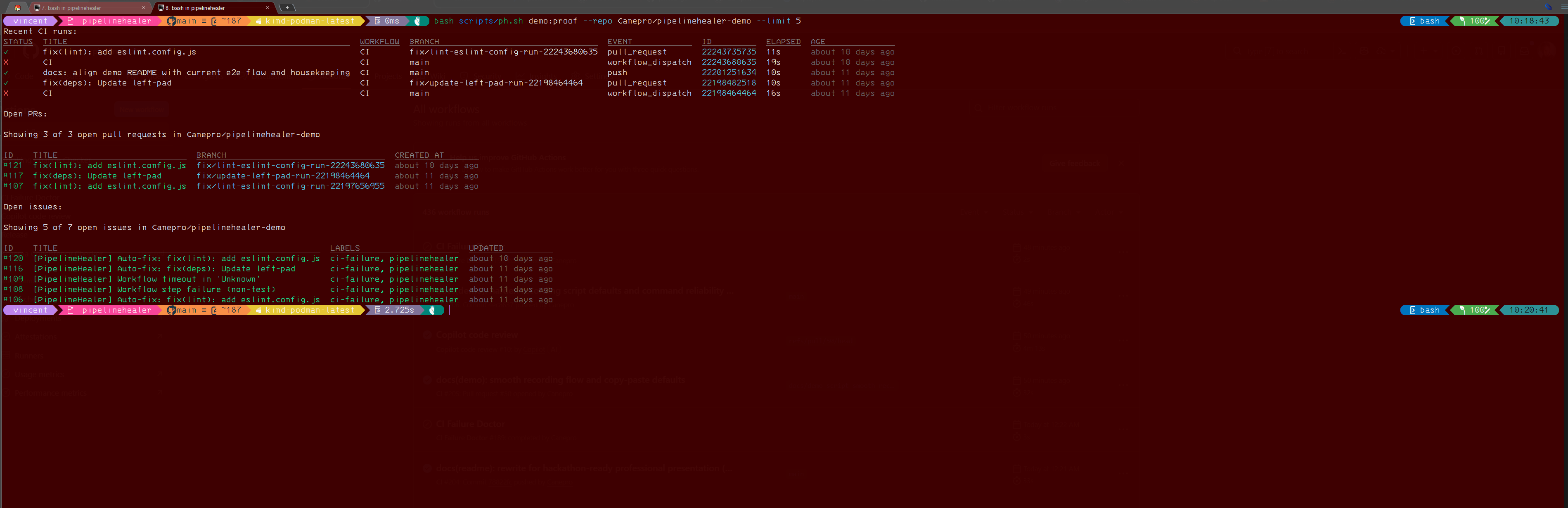
Demo proof command in practice (bash scripts/ph.sh demo:proof --repo Canepro/pipelinehealer-demo --limit 5) showing run-to-artifact evidence collection.
What I Would Do Differently
1. Start with the E2E test, not the agents
I built agents first, then wired them together, then deployed, then tested end-to-end. The right order is the reverse: define the E2E scenario first ("webhook arrives, PR opens"), build the thinnest possible path that achieves it, then improve each step.
Every major insight came from E2E testing. The backfill system, the sanitizer, the polling window tuning, the UI panel design, all of them came from watching the deployed system process a real failure. I would have found these sooner if I had started from the outside in.
2. Build backfill from day one
Any system that depends on external data arriving within a window needs a backfill mechanism from the start. I treated external diagnostics polling as "poll and move on." That was fine for the primary path but left stale data in the activity record.
The backfill pattern, periodic sweep for incomplete records, re-fetch, patch in place, is generic enough that I should have scaffolded it early and specialized it later.
3. Fewer healing modes
PipelineHealer has four modes: safe, demo, freestyle, and debug. In practice, I used safe for everything real and debug when something was broken. demo/freestyle exist for more aggressive automation, but I rarely switched to them.
If I started over, I would have safe and debug only. Two modes are easier to reason about and test than four.
4. Pin the demo repo fixture set earlier
The demo repository went through several iterations of its CI workflow, adding failure types, changing dispatch inputs, cleaning up dead files. Each time, I had to re-validate the E2E flow.
I should have frozen the demo fixture set after the first successful E2E run and only added new failure types in planned batches. Incremental fixture changes created unnecessary re-testing cycles.
By the Numbers
Some of these numbers moved after the hackathon, so these are the current repo-level counts where the codebase changed materially:
- 268 backend tests collected in the current repo
- 6 demo failure types in the current fixture set (dependency, lint, prettier, test, build_config, timeout)
- 4 specialized agents (Log Analyzer, Diagnosis, Remediation, Orchestrator)
- 1 CLI entrypoint with 20+ commands
- 1 background sweep running every 10 minutes
What Was Still on the Table at Submission Time
These were real gaps in the v0.3.0 submission baseline, not aspirational features:
- Lockfile-aware dependency fixes: the current dependency remediation edits
package.jsonbut does not regenerate lockfiles. A production version would need to handlepackage-lock.json,pnpm-lock.yaml, andbun.lockb. - GitHub App auth: I used a PAT throughout. The current repo surfaces GitHub App readiness in operator views, but the active GitHub client path still uses a PAT or externally supplied token, so full App-native auth remains unfinished.
- Notification delivery channels: at submission time, diagnostics were strongest in the app and chat delivery to Slack/Teams/Rocket.Chat was still a planned extension for non-admin stakeholders. This later shipped in
v0.5.0alongside email delivery. - Multi-provider CI support: at submission time, PipelineHealer was GitHub Actions only. The adapter pattern existed, but GitLab CI and Jenkins adapters were not built. Jenkins bridge support later landed in
v0.3.2; broader provider coverage is still open.
The Honest Summary
PipelineHealer works. It does what the pitch says: detect CI failures, diagnose them, and open fix PRs or structured issues. The deployed system on Azure processes real webhook events and produces real remediation artifacts.
The most useful lessons sat outside the agent logic: deployment failures, timing gaps, sanitization edge cases, and operator workflow showed up only in real usage. Agents are roughly 30% of the code; infrastructure, safety gates, observability, CLI, and integrations are the rest.
Reusable Takeaway Checklist
- Deploy to your target infrastructure on day one, not after the code is "ready."
- Use deterministic logic first. Reserve AI for genuine ambiguity.
- Type your agent-to-agent contracts. Free-form text handoffs are a debugging nightmare.
- Build your operator CLI before your dashboard. You will use it more.
- Budget time for sanitizing third-party content. It is never clean.
- Test end-to-end against the deployed system. Component tests miss timing and integration gaps.
- Default to safe. Conservative defaults prevent surprises during demos and in production.
- Write about what you are building. It forces clarity you will not get from code alone.
Post 6 of 6 in the AI Dev Days Hackathon series.