I triggered a dependency failure in the demo repo at 10:42 PM on a Saturday night. Eleven minutes later, a fix PR was open, a tracking issue was filed, and a separate AI workflow had published its own diagnosis. The dashboard showed the full story in one place.
That sounds clean. Getting there was not.

This post traces the actual execution path of that run, every step from webhook to merged output, and covers an entire subsystem I had to build because external diagnostics do not arrive on your schedule.
Current project baseline is v0.3.0, which adds Activity Detail Copy Context and a visible Assign to Agent (Coming Soon) handoff affordance. This write-up focuses on the webhook-to-remediation reliability path that underpins those UX layers.
For system context, see the PipelineHealer architecture diagram and the PipelineHealer repository.
The Trigger
I ran this from my terminal:
gh workflow run CI --repo Canepro/pipelinehealer-demo --field failure_type=dependency
The demo repo's CI workflow has a dispatch input that injects a specific failure. For dependency, it adds [email protected] to package.json, a version that does not exist. The workflow fails at npm install.
GitHub fires a workflow_run.completed webhook to PipelineHealer's backend on Azure Container Apps.
Webhook Reception and Gating
The webhook handler is the first filter. Before any agent work happens, it checks:
- Signature verification: HMAC-SHA256 against
GITHUB_WEBHOOK_SECRET. Invalid signatures get a401immediately. - Event type: only
workflow_runevents withconclusion: failureproceed. Successful runs, in-progress runs, and non-workflow events are ignored. - Repo allowlist:
PH_ALLOWED_REPOSis enforced here. If the source repo is not on the list, the event is dropped with a reason code. This prevents the PAT from being used against unintended repositories. - Idempotency: duplicate
workflow_runIDs are caught before creating a new activity.
If all gates pass, an ActivityRecord is created with status processing and the orchestrator takes over.
Log Extraction
The orchestrator's first step is fetching the failure data.
PipelineHealer calls the GitHub API to get the workflow run's jobs, then fetches logs for each failed job. The raw log output is structured into error lines, warning lines, key events, and a compact summary. This is the Log Analyzer agent's only job, extraction, not diagnosis.
For this run, the extracted signal was clear:
- error line:
npm ERR! 404 Not Found - GET https://registry.npmjs.org/left-pad/999.0.0 - key event:
Process completed with exit code 1
That is a tight signal. No ambiguity about what broke.
Diagnosis: Pattern Match, Not Model Call
The diagnosis step ran the extracted summary through deterministic pattern checks first.
Result:
- Pattern:
dependency(missing or unresolvable npm package) - Confidence: high
- Failure type:
dependency - Auto-fixable: yes
No LLM call was needed. The model fallback covers ambiguous cases: unclear test assertions, unfamiliar build tools, odd config errors.
Pattern matching first. Model second. Every failure type that resolves with string matching should.
Remediation: Branch, Commit, PR
With a high-confidence dependency diagnosis, the remediation agent built a fix:
- Created a branch (
fix/update-left-pad) from the failing commit's base - Generated a corrected
package.jsonthat removes the bad dependency entry - Committed the change
- Opened PR #91 against
main
For this run configuration (AUTO_CREATE_TRACKING_ISSUE_FOR_PRS=true), it also filed Issue #90 as a tracking artifact with the full diagnosis context: failure type, confidence, evidence lines, and the remediation action taken.
The PR body includes the root cause, the specific change, and a link back to the failing workflow run. A reviewer can verify the fix without re-reading logs.
At this point, PipelineHealer's own work is done. The activity record is updated to completed, remediation outputs are stored, and the dashboard reflects the full chain.
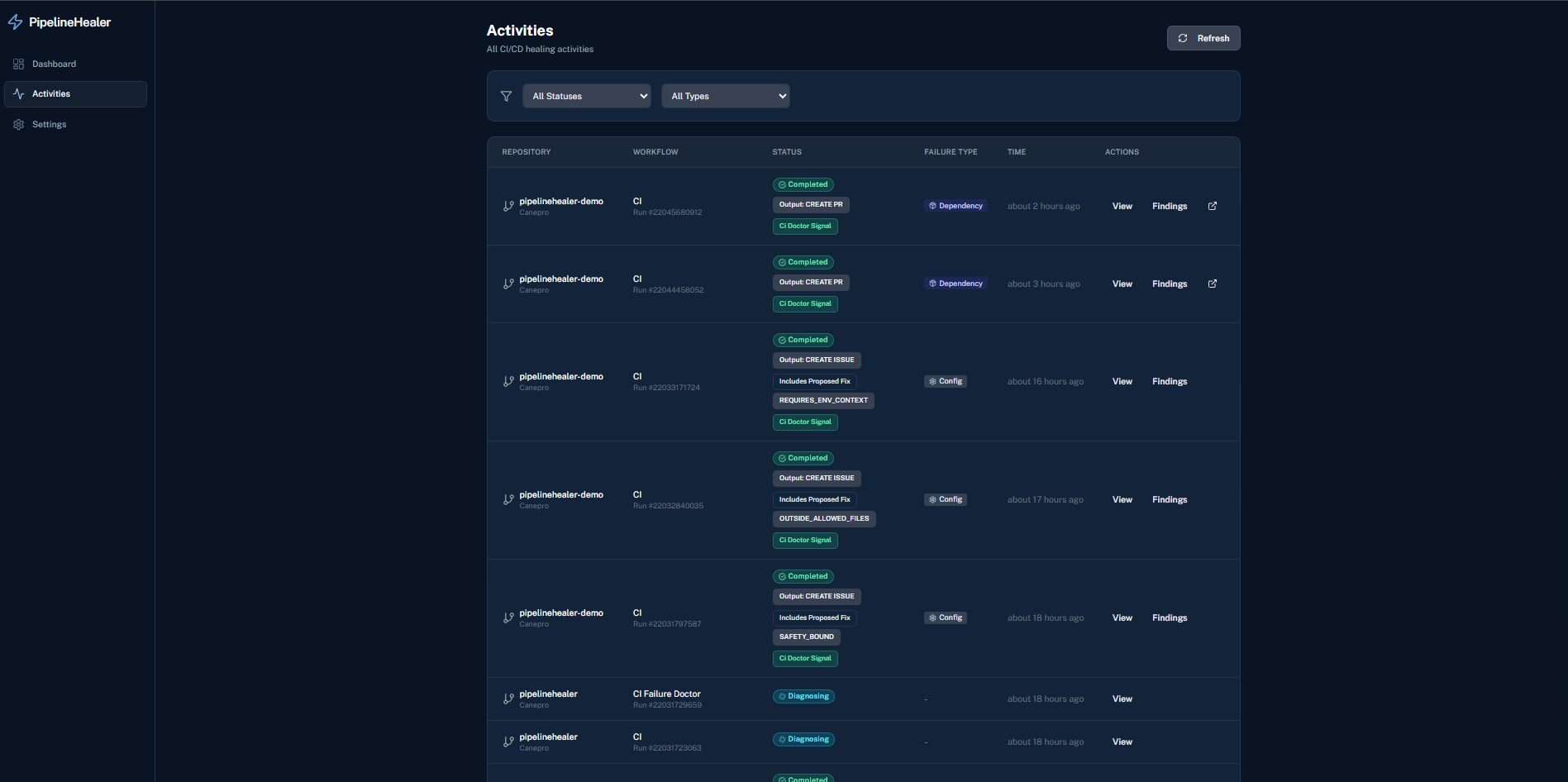
But there is another actor in the system.
ci-doctor: The External Diagnostic That Runs on Its Own Clock
When GitHub Agentic Workflows are installed on a repository, ci-doctor fires automatically on workflow_run failures. It is an independent AI analysis workflow maintained by GitHub, separate from PipelineHealer.
PipelineHealer treats ci-doctor as an optional, additive signal. In this run, integration mode was passive: PipelineHealer never dispatched ci-doctor; it only checked whether findings existed after the fact.
During this run, the orchestrator polled for ci-doctor issues that correlated with the activity (run_id, head_sha, bounded time window) using the then-current ~8 minute window and backoff.
Current behavior supports GH_AW_INGESTION_MODE=hybrid, where passive ci-doctor findings and direct GitHub MCP context can coexist in one activity.
- Default wait budget is 60 seconds with async backfill.
- Passive matching is hardened for label-drift cases.
Here is where I hit a real problem.
The Timing Gap I Did Not Anticipate
ci-doctor takes time. It fetches logs, runs its own AI analysis, and publishes an issue. For my test run, PipelineHealer's diagnosis completed in under 2 minutes. ci-doctor was still running 11 minutes later.
PipelineHealer's bounded polling window expired. It stored a poll_window_exhausted status for external diagnostics and continued with its own native diagnosis, which was already sufficient.
But that meant the dashboard showed "External diagnostics: poll window exhausted" even after ci-doctor eventually published Issue #89 with a thorough analysis.
This was not a bug. The system correctly prioritized its own diagnosis and did not block on an external tool. But the result was incomplete information in the activity record. A user looking at the dashboard later would not see ci-doctor's findings.
I needed a backfill mechanism.
Building the Backfill Sweep
The fix was straightforward in concept: periodically re-check completed activities that have poll_window_exhausted external diagnostics and see if findings have arrived since.
Implementation:
- A background task runs every 10 minutes, queries storage for backfill candidates, and re-fetches external diagnostics via the GitHub API.
- A manual endpoint (
POST /api/backfill-diagnostics) allows immediate on-demand backfill for impatient operators. - A CLI command (
bash scripts/ph.sh backfill) wraps that endpoint. - A UI button ("Backfill Diagnostics") on the activity detail page does the same thing from the browser.
When backfill finds a ci-doctor issue that correlates with the activity, it replaces the poll_window_exhausted entry with the real findings.
I built the backfill sweep after an E2E run showed poll_window_exhausted persisting even after ci-doctor finished. Component tests would not have caught the timing gap.
Deep Enrichment: Not Just a Link
The first version of external diagnostics stored a link to the ci-doctor issue and some metadata. Useful, but shallow.
I wanted the dashboard to show what ci-doctor actually found, not just that it found something.
So I added structured extraction from ci-doctor issue bodies. The parser pulls out:
- Summary: one-line problem statement
- Root cause: detailed analysis
- Recommended actions: specific fix steps
- Historical context: related failures and patterns
- Doctor metadata: which AI engine and model produced the diagnosis
These fields are stored in external_diagnostics[].metadata.details on the activity record.
There was a catch: ci-doctor issue bodies include internal boilerplate, HTML comments, AI attribution footers, setup hints, expiry markers, temp-file paths. All of that needed to be stripped before storage. I wrote a sanitizer with regex patterns for each category of noise. Then I wrote tests for the sanitizer, because regex sanitizers are the kind of code that breaks silently.
The External Findings Panel
With structured data available, the frontend needed a way to render it.
I added a collapsible "External Findings Details" panel inside the activity detail view. It renders each extracted section with proper formatting, bullet lists, inline code, bold text, links, instead of raw whitespace. Long sections are truncated with "Show more" to keep the card scannable.
The panel auto-expands when the diagnostic status is available and details exist. If the diagnostic is still poll_window_exhausted or errored, it stays collapsed. Users can always expand or collapse manually.
One detail that mattered: the panel had to handle missing sections gracefully. Not every ci-doctor issue has every section. Empty sections are hidden, not rendered as empty boxes.
The Full Picture
For the E2E run that validated all of this, the activity detail page showed:
- Status: completed
- Failure type: dependency (confidence: high)
- Action taken: Create PR
- PR link: #91
- Issue link: #90
- External diagnostics: available (ci-doctor)
- External findings panel: summary, root cause, recommended actions, historical context, all rendered cleanly
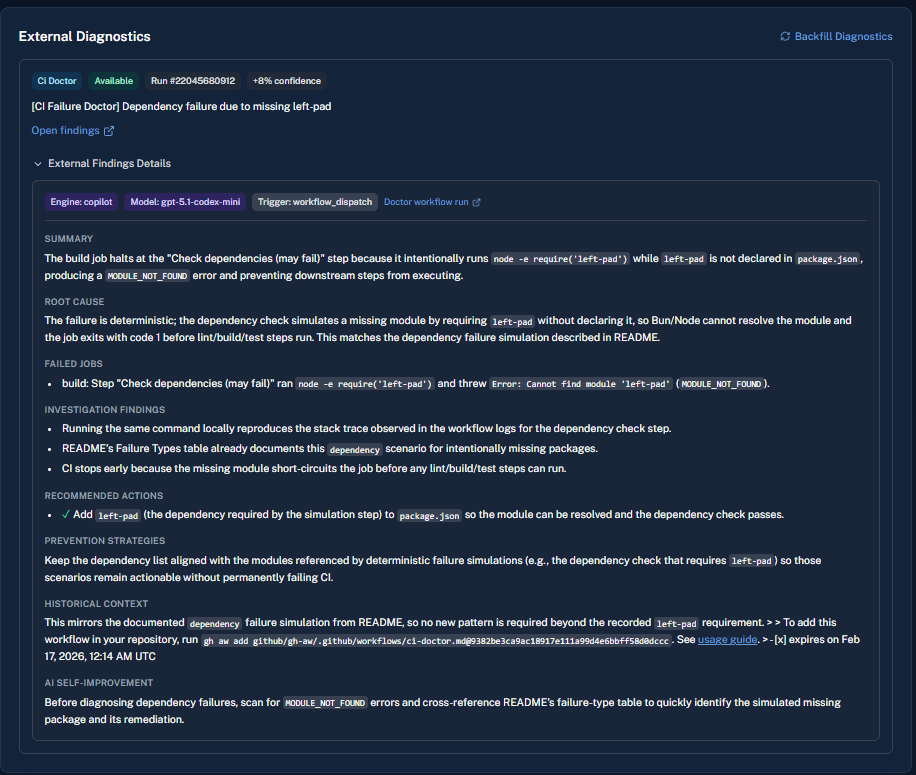
That is the full loop. Webhook to PR, with an independent AI second opinion enriching the record after the fact.
What I Would Not Have Built Without E2E Testing
The backfill sweep, the deep enrichment parser, and the sanitizer all came out of running the real system end-to-end and watching what happened.
If I had only tested components in isolation, the shipped system would have:
- diagnosed and fixed failures correctly
- shown
poll_window exhaustedfor external diagnostics permanently - stored raw
ci-doctorboilerplate - rendered HTML comments in the UI
Each gap showed up on a deployed run, not in unit tests.
Reusable Takeaway Checklist
- Gate webhooks early: signature, event type, repo allowlist, idempotency, before any compute.
- Extract structure before diagnosis. Never pass raw logs to a decision agent.
- Use deterministic pattern matching first. Reserve model calls for genuine ambiguity.
- Treat external tool integration as eventual-consistency, not request-response.
- Build backfill mechanisms for any data that might arrive after your processing window.
- Sanitize third-party content before storage. Internal boilerplate will leak into your UI.
- Test the deployed system end-to-end. Component tests do not catch timing and integration gaps.
Post 5 of 6 in the AI Dev Days Hackathon series.